
Preparing a studio interview: camera, light, seating, useful measurements and a readable stage layout.
Support Lumiere Studio on Ko-fi

Lighting diagram

How to prepare a clear interview lighting diagram for a fast studio shoot.

For interviews, the diagram needs to show logistics as much as light. Camera position, chair placement, LED panels, monitor placement and crew paths matter just as much as the quality of the key light.

Camera + subjectThe plan makes the main axis and shooting distance instantly readable.
Power and distancesThe setup stays easy to read with panels, distances and backdrop placement clearly identified.
Zoom on mobile and desktopInspect the stage in detail from the browser on phone or computer.
PDF and custom presetExport the final brief or save your own shooting version.
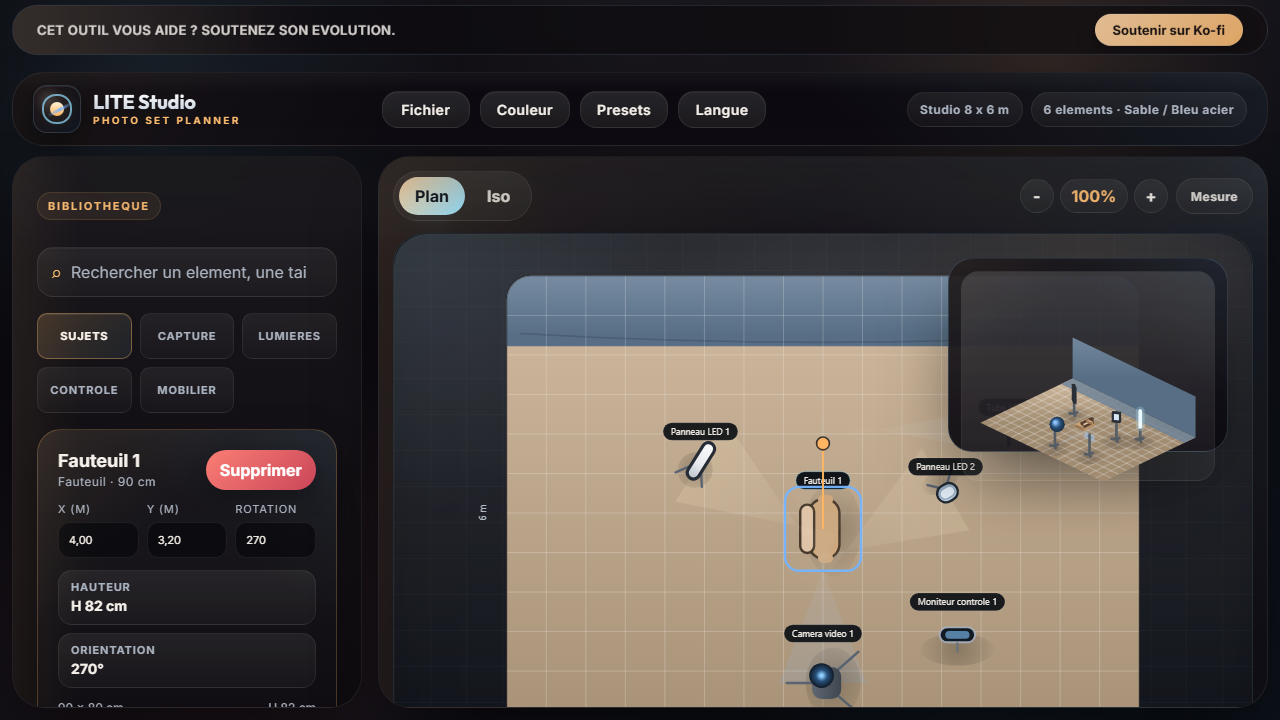
Interview lighting diagram prepared in Lumiere Studio
Example of a video interview setup with camera, LED panels, seating, stage control and the current interface.

1. Lock the axis

Camera placement defines the rest of the plan.

Before talking about lights, fix the camera axis, eyeline direction and chair position. Those choices determine where the LEDs, backdrop and separation tools need to go.

2. Stay simple

A 2 point LED setup already covers many cases.

A soft key, a fill or secondary panel and then a small separation source are often enough for a clean interview. The diagram mainly exists to make that base easy to reproduce.

3. Check the markers

Measure camera to subject and subject to backdrop before export.

Measure mode helps confirm the key distances of the shoot and makes the document more operational for both the camera crew and production.

Who is it for

Interviews, video podcasts, BTS and corporate content.

This page is built for light studio productions, branded content, YouTube interviews and filmed podcast setups.

Target search

Interview lighting diagram, studio interview setup, interview video lighting.

It targets searches made right before building an interview stage and explaining it to a crew or client.

Take action

Load the interview base and adapt it to your shoot.

Change the camera distance, swap panels, adjust the backdrop, enable Measure and export the plan as PDF before setup begins.

Try the interview setup