
A practical walkthrough to build a readable portrait lighting diagram, review measurements and share it before the shoot.
Support Lumiere Studio on Ko-fi

Portrait lighting diagram

How to prepare a clean, simple portrait lighting setup your team can execute fast.

A good portrait lighting diagram is not just about having a nice lighting idea. It also needs to show where to place the key light, fill, camera, subject and control tools, then confirm the right distances before the build.

Key lightUse a large source at 45 degrees for a soft and versatile result.
Auto measurementsCheck light to subject, subject to backdrop and camera to subject without manual calculations.
Zoom on mobile and desktopInspect the stage in detail with the mouse wheel or pinch.
PDF and custom presetExport the plan or save your own variant after the tweaks.
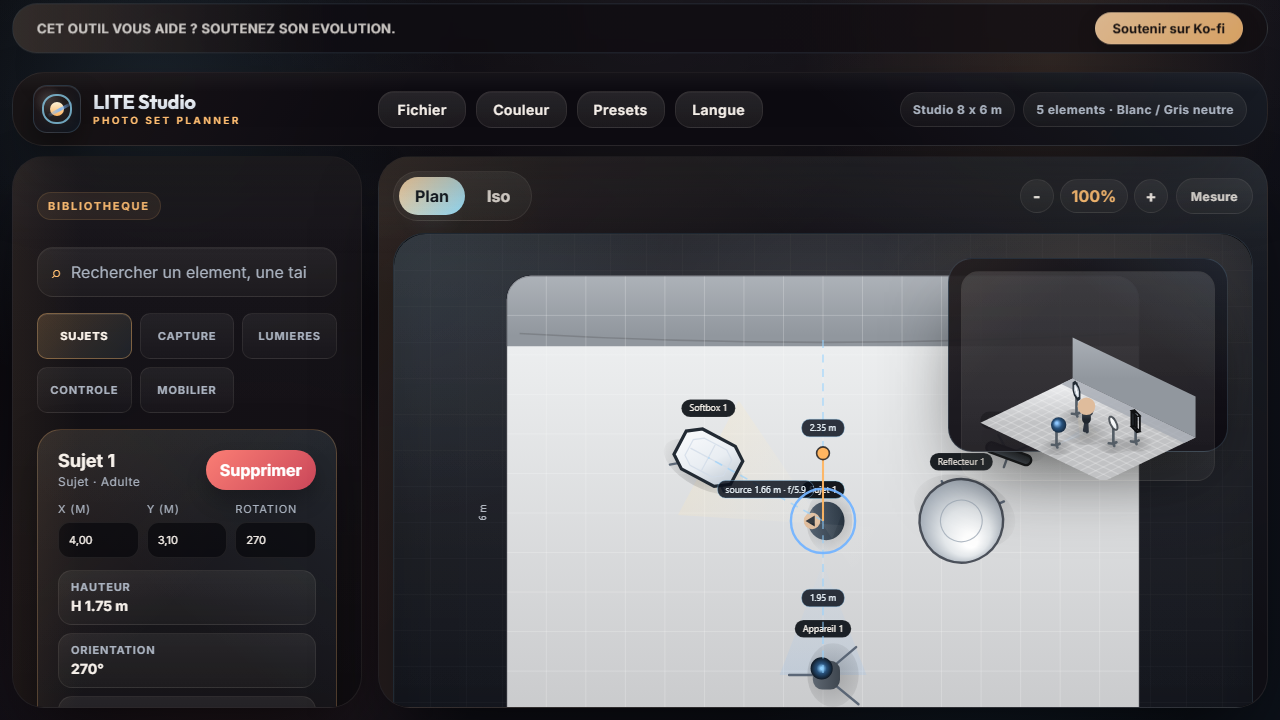
Portrait lighting diagram prepared in Lumiere Studio
Example of a portrait setup with the main source, camera, light control and measurements visible on the plan.

1. Start simple

One well placed source is often enough.

For a classic portrait, start with an octabox or a large rectangular softbox placed about 45 degrees from the subject and slightly above eye level. That base covers many corporate, editorial and actor headshot needs.

2. Shape the fill

Use bounce or negative fill to match the intent.

A simple reflector can open the shadows. On the other hand, a flag or black panel can deepen contrast and define the face more strongly. The plan should show that element clearly because it changes the final look a lot.

3. Verify the distances

Measure turns the diagram into a real stage plan.

Once the base is placed, enable Measure to confirm the light to subject distance, the camera to subject distance and the backdrop distance. That creates a document that is useful for the brief and for the build.

Who is it for

Portrait, corporate, light beauty and editorial work.

This page is useful if you want a solid base for a simple studio portrait that stays fast to install without sacrificing clarity or image quality.

Target search

Portrait lighting diagram, photo studio plan, portrait lighting setup.

The goal is to answer the exact queries a photographer, assistant or studio might search right before an indoor portrait session.

Take action

Load the setup directly in the app.

Start from the soft portrait preset, review the useful distances, adjust the modifier, save your variant and export the plan as PDF.

Try the portrait setup